Widgets have revolutionized the way we interact with our smartphones, providing quick access to key information and simplifying everyday tasks. Whether you’re using an iPhone or an Android device, the right widgets can enhance your experience and make your phone more productive and enjoyable. In this article, we’ll highlight 5 must-have widgets for both iPhone and Android in 2024, covering everything from productivity to entertainment.
 Pedometer++
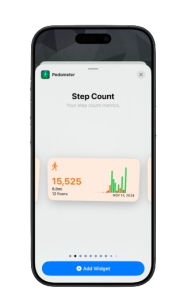
For fitness enthusiasts, Pedometer++ tracks your steps and daily activity. It syncs with Apple Health, making it easy to monitor your fitness goals throughout the day.
Best For: Step tracking and fitness goals.
Notion
The Notion widget is perfect for organizing notes, tasks, and projects. Whether it’s for work, school, or personal use, it gives you quick access to everything you need to stay organized.
Best For: Task management and note-taking.
Spotify
The Spotify widget lets you control your music right from the home screen. Play, pause, and skip tracks, or switch playlists without opening the app.
Best For: Quick music control.
Pedometer++
For fitness enthusiasts, Pedometer++ tracks your steps and daily activity. It syncs with Apple Health, making it easy to monitor your fitness goals throughout the day.
Best For: Step tracking and fitness goals.
Notion
The Notion widget is perfect for organizing notes, tasks, and projects. Whether it’s for work, school, or personal use, it gives you quick access to everything you need to stay organized.
Best For: Task management and note-taking.
Spotify
The Spotify widget lets you control your music right from the home screen. Play, pause, and skip tracks, or switch playlists without opening the app.
Best For: Quick music control.
 Todoist
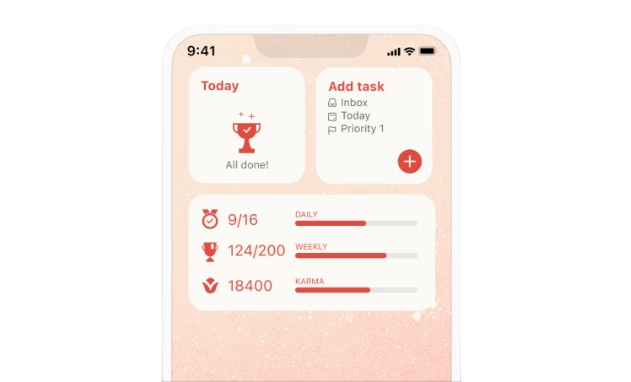
Stay productive with the Todoist widget. It gives you direct access to your to-do lists and tasks, allowing you to mark them off as you complete them.
Best For: Organizing tasks and staying productive.
Todoist
Stay productive with the Todoist widget. It gives you direct access to your to-do lists and tasks, allowing you to mark them off as you complete them.
Best For: Organizing tasks and staying productive.
 Spotify
Much like iPhone users, Android users can also enjoy the Spotify widget. It offers easy control of your music, allowing you to play, pause, and skip tracks from the home screen.
Best For: Simple music controls.
Spotify
Much like iPhone users, Android users can also enjoy the Spotify widget. It offers easy control of your music, allowing you to play, pause, and skip tracks from the home screen.
Best For: Simple music controls.
5 Must-Have Widgets for iPhone in 2024
Weather Widget The Weather widget keeps you informed about the weather in real-time. Whether you prefer hourly updates or a full daily forecast, it helps you stay prepared for any weather changes right from your home screen. Best For: Quick weather checks. Calendar Widget The Calendar widget shows your upcoming events, appointments, and reminders, so you can stay on top of your schedule without having to open the app. Best For: Keeping track of your day’s events.
Pedometer++
For fitness enthusiasts, Pedometer++ tracks your steps and daily activity. It syncs with Apple Health, making it easy to monitor your fitness goals throughout the day.
Best For: Step tracking and fitness goals.
Notion
The Notion widget is perfect for organizing notes, tasks, and projects. Whether it’s for work, school, or personal use, it gives you quick access to everything you need to stay organized.
Best For: Task management and note-taking.
Spotify
The Spotify widget lets you control your music right from the home screen. Play, pause, and skip tracks, or switch playlists without opening the app.
Best For: Quick music control.
5 Must-Have Widgets for Android in 2024
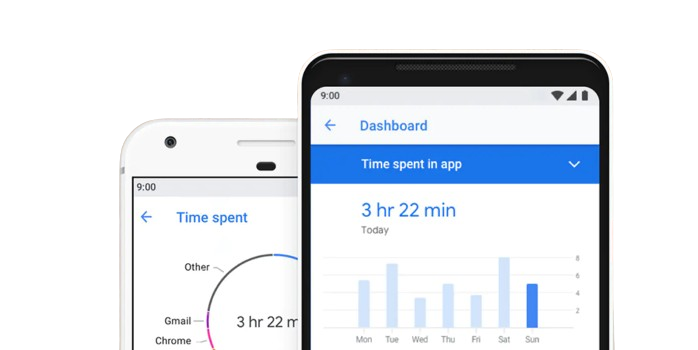
Google Keep The Google Keep widget is ideal for quickly taking notes and managing to-do lists. You can create, edit, and check off tasks directly from your home screen. Best For: Fast note-taking and list management. Gmail With the Gmail widget, you can check your inbox, compose emails, and manage messages without opening the Gmail app. It’s a time-saver for staying on top of your email. Best For: Efficient email access. Digital Wellbeing The Digital Wellbeing widget helps you track your screen time and app usage. It’s a great tool for managing your phone habits and ensuring a healthier balance with technology. Best For: Monitoring screen time and digital health.
Todoist
Stay productive with the Todoist widget. It gives you direct access to your to-do lists and tasks, allowing you to mark them off as you complete them.
Best For: Organizing tasks and staying productive.
Spotify
Much like iPhone users, Android users can also enjoy the Spotify widget. It offers easy control of your music, allowing you to play, pause, and skip tracks from the home screen.
Best For: Simple music controls.