Losing precious photos and videos can be heartbreaking, but thankfully, there are several methods to recover your deleted media files. In this guide, we'll focus on the best ways to recover deleted photos and videos, with a special emphasis on using Tiger Data Recovery software.





Introduction
Accidentally deleting photos and videos can happen to anyone. Whether it’s a memorable vacation snapshot or an important video, the loss can be significant. Fortunately, recovering recently deleted photos and videos is often possible with the right tools and techniques. Here’s how you can do it.
1. Check the "Recently Deleted" or "Trash" Folder
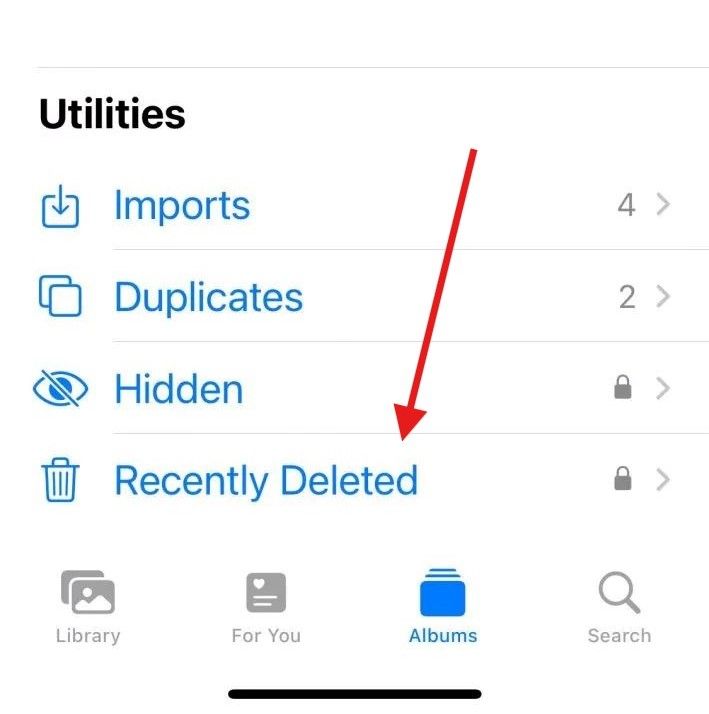
Most smartphones and digital cameras come with a "Recently Deleted" or "Trash" folder where deleted photos and videos are stored temporarily before being permanently erased. Steps:- Open Your Photos App: Navigate to the photos or gallery app on your device.
- Go to Albums: Scroll to find the "Recently Deleted" or "Trash" folder.
- Select and Restore: Browse through the folder to find your deleted photos and videos. Select the ones you want to recover and click the "Restore" button.
Image unavailable in the original article.
2. Use Cloud Backup Services
If you have enabled cloud backup services such as iCloud or Google Photos, recovering deleted photos and videos can be even simpler.iCloud (for iOS Users):
- Go to Settings: Open your device settings and tap on your Apple ID.
- Select iCloud: Navigate to iCloud and check if your photos are backed up.
- Restore from iCloud: Access your photos app and look for your deleted photos in the cloud storage.
Google Photos (for Android and iOS Users):
- Open Google Photos: Launch the Google Photos app on your device.
- Trash Folder: Go to the "Trash" folder.
- Select and Restore: Find your deleted photos and videos, select them, and tap "Restore".
3. Use Tiger Data Recovery Software
When the above methods fail, using a dedicated data recovery software like Tiger Data Recovery can be your best option. This powerful tool can recover deleted photos and videos even after they have been removed from the trash or cloud storage. Steps:- Choose a recovery mode
- Choose data type
- Preview and recover data