Can you recover a LINE account?
In many cases, yes — if you still have access to your old device, registered phone number, or a previously linked Apple ID or Google account. However, a LINE account that has been permanently deleted cannot be restored.
The correct recovery method depends on what you still have access to. This guide covers each situation step by step.

Part 1: Understanding the Possible Causes
Before resolving the issue, it’s important to understand the possible reasons for being unable to log in. Here are some common causes:
-
- Forgotten password – You can’t remember your LINE password.
- Incorrect login information – The email address, phone number, or password you entered is incorrect.
- Verification problems – You can’t receive the verification code or your phone number has changed.
- Account restrictions – LINE may temporarily restrict login or account transfer attempts.
- Account suspension – Your account may have been suspended for violating LINE’s policies.
- Connection or app issues – A poor connection, outdated app, or device issue may prevent login.
Part 2: Solutions to Recover Your Account
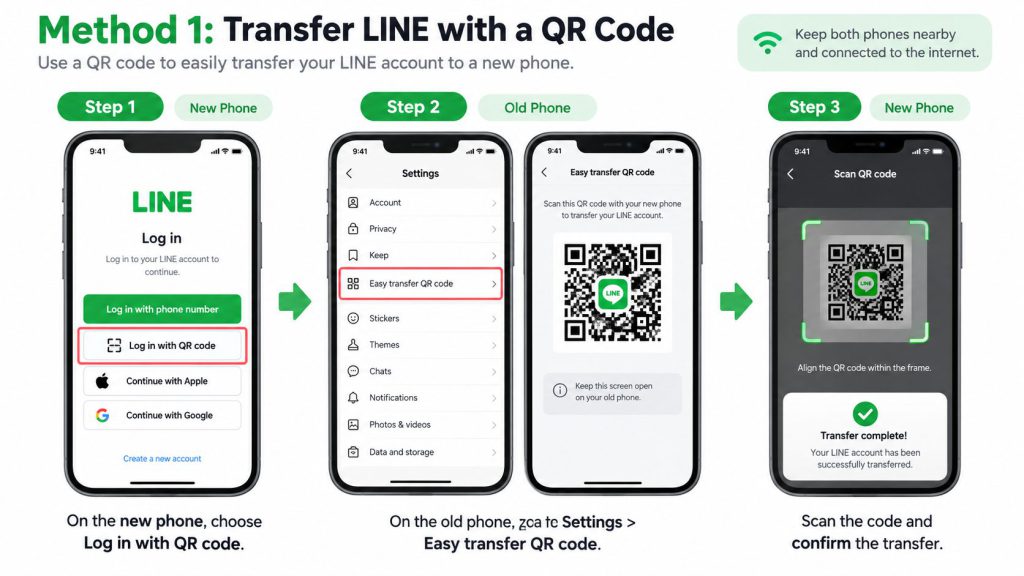
Method 1: Transfer LINE with a QR Code
If your old phone still works, LINE’s Easy Transfer QR Code is usually the easiest option.
On the new phone, choose Log in with QR code. On the old phone, go to Settings > Easy transfer QR code, then scan and confirm the transfer.
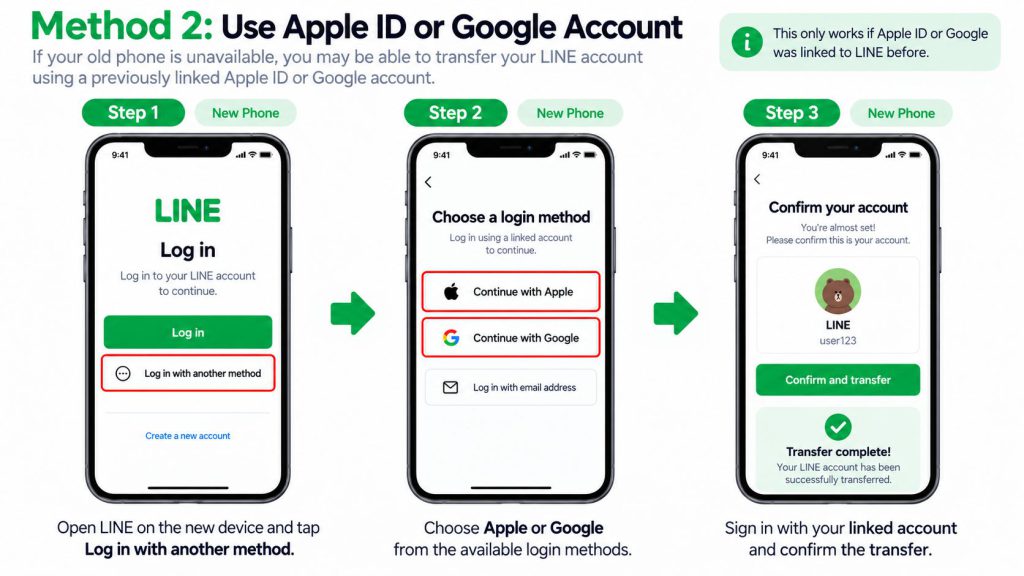
Method 2: Use Apple ID or Google Account
If your old phone is unavailable, you may be able to transfer your LINE account using a previously linked Apple ID or Google account.
Open LINE on the new device, tap Log in > Log in with another method, then choose Apple or Google.
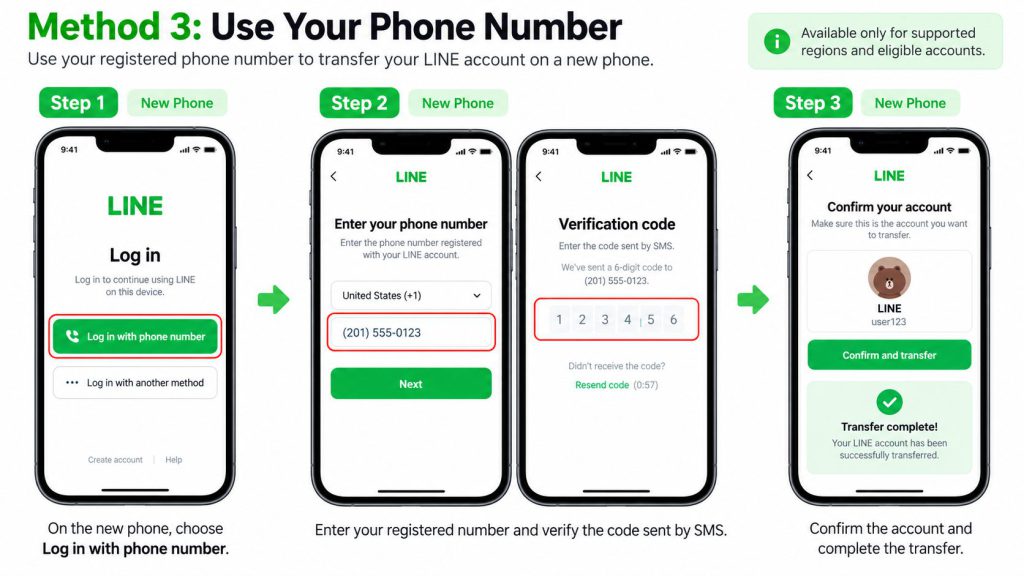
Method 3: Use Your Phone Number
Phone-number login is available only in supported regions and account situations. If the option appears, enter your registered number, verify the code, and confirm your LINE account.
Forgot Your LINE Password?
If you still have access to your registered email address, use Forgot your password? on the login screen to reset it.
If you no longer have access to the old phone or registered email, try a linked Apple ID or Google account instead.
Contacting Line Customer Support
If none of the above methods work, it’s recommended to contact Line’s customer support for further assistance. They will be able to guide you through the account recovery process and help resolve any login issues you’re experiencing.
Bonus Tip: Recover Line Chat History
After you have regain your access to Line account, in case you want to recover your chat history, you can find solutions in this article. Recovering your LINE account does not always restore your chat history. Chat recovery depends on your backup, transfer method, and device.
Check LINE’s official backup options first. If some LINE data is still missing from your iPhone or existing backup, you can also use Tiger Data Recovery to scan for recoverable data. Recovery results depend on what data is still available.
Conclusion
There is no single “recover LINE account” button because different kinds of loss require different fixes.
If the old phone still works, start with the Easy Transfer QR Code. If it doesn’t, check whether an Apple ID, Google account, email address, password or supported phone number is already tied to the account.
And remember that recovering the account and recovering the chat history are two separate jobs.
The earlier you identify which one you actually need, the less likely you are to make the problem worse.