In the digital age, LINE is your life’s “black box”—storing priceless memories like work agreements, baby photos, and love stories.
Losing chats means losing part of your story. How can you backup LINE chats permanently and securely?
We compared 3 LINE backup methods to help you choose:
•Cloud backup for device migration
•Offline tools (like Tiger Data Backup) for full control
•Screenshots (not recommended)
Find the best way to save LINE photos, recover messages, and export chats to computer without losing quality.

In this Article
ToggleMethod 1: LINE’s Official Cloud Backup (For Those Switching Phones)

Pros:
•Free to use
•Natively supported on iOS/Android—directly operable within the LINE app
•Ideal for full-device migration and data synchronization
Cons:
•Backup files cannot be directly viewed
•Only supports migration within the same OS (iOS → iOS, Android → Android)
•Requires proactive backup—cannot recover already lost chats after the fact
If you’re simply preparing to switch phones and don’t mind not being able to directly view your backups, this method is the most convenient.
Method 2: Tiger Data Backup (Smart Choice—Highly Recommended)
Tiger Data Backup: Secure and Reliable iPhone Backup Solutions
Want true control over your chat history? This is the most intelligent and comprehensive solution available.
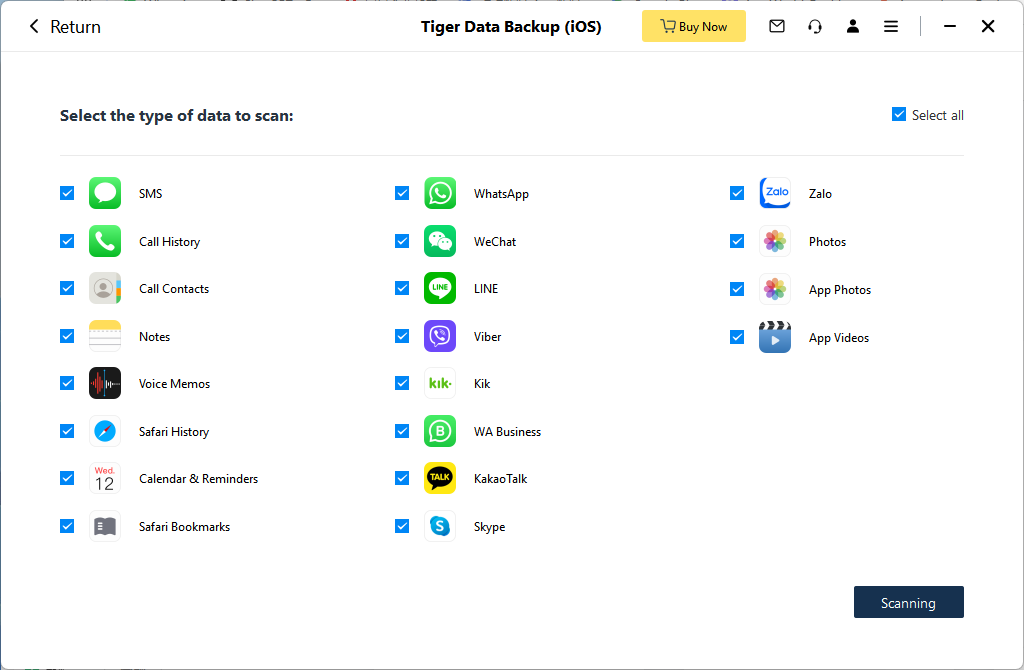
Pros:
•Supports not only LINE but also WhatsApp, Viber, photo galleries, voice memos, and more—all in one place
•Backup files are readable, shareable, storable, and directly accessible
•100% complete backup with original-quality media preservation
•Super simple operation: connect your phone to a computer → click “Backup” → done in minutes.
•Works offline.100% secure with zero risk of data loss
Cons:
•Requires a data cable and computer
If you want to break free from manufacturer cloud limitations and access/organize your chats anytime, anywhere, this is the best option.
Method 3: Manual Screenshots (Backup Illusion—Not Recommended)

Pros:
•No tools needed—ready to use immediately
Cons:
•Long conversations turn into hundreds of fragmented screenshots
•Loses timestamps, sender info, and media quality
•Impossible to search or organize
•Time-consuming and tedious
Screenshots might work for saving a line or two, but for anything truly important, they’re a disaster.
Conclusion
Stop relying on fragmented screenshots or unreadable cloud backups. Choose a safer, more efficient way to ensure your chat history is:
•Preserved permanently
•Accessible anytime
•Backed up losslessly
•Readable and searchable
Highly recommended: Tiger Data Backup—solve all your backup worries in one go, protecting your past and securing your future.
Click here to try Tiger Data Backup now! Tiger Data Backup: Secure and Reliable iPhone Backup Solutions