Contacts are the lifeline of your iPhone, making it easy to call or text friends, family, and colleagues without memorizing numbers. Losing them can feel like a total disaster. But there’s no need to panic if you have a backup. Do you have one? If so, let us explore the 4 leading ways to restore contacts on your iPhone, featuring a powerful and versatile tool as our top recommendation. Scroll down to discover the must-know information.
In this Article
ToggleHow to Restore Contacts on iPhone with Tiger iPhone Data Recovery

When looking for a comprehensive and efficient solution, Tiger iPhone Data Recovery (also known as TigerDR for iOS) stands out as the premier choice. Hailed as the world’s best iOS data recovery software, it can recover much more than just contacts—including photos, videos, text messages, WhatsApp chats, and over 24 other data types.
Whether you have no backup or want to selectively restore from an existing one, its three flexible modes offer a versatile solution. The “Preview before Recovery” feature is a game-changer, allowing you to pick and choose exactly which contacts to retrieve.
How to retrieve deleted contacts on iPhone using this powerful third-party tool? Follow these simple steps:
Step 1: Download and install Tiger iPhone Data Recovery on your computer. Launch the software to see the main interface with three recovery modes.
Step 2: Choose the recovery mode that best suits your situation:
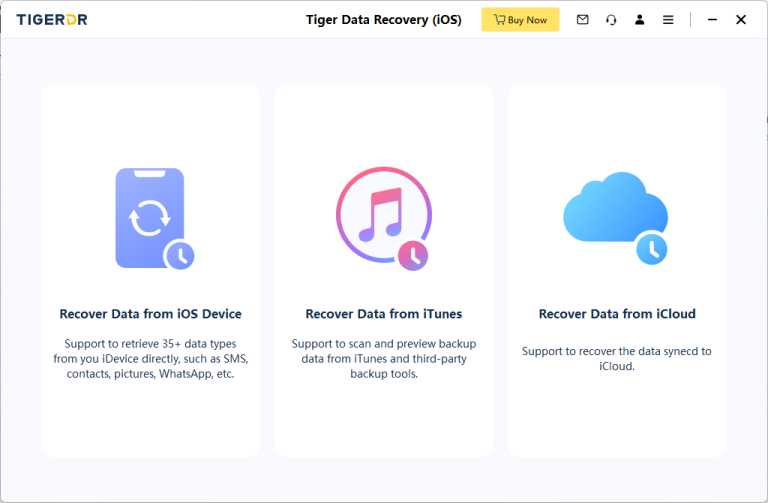
Recover from iOS Device (No Backup Needed): Connect your iPhone to the PC. Click Start Scan. Once the scan is complete, select Contactsfrom the list on the left. Preview the found contacts, check the ones you want, and click Recover.
Recover from iTunes Backup: Choose this mode. The software will automatically display the iTunes backup files found on your computer. Select the relevant backup, click Start Scan, then preview and recover your contacts as above.
Recover from iCloud Backup: Select this option. Log in to your iCloud account. The program will list your available backups. Choose the right one, download and scan it, then preview and restore your lost contacts.
The entire process is streamlined into three clear steps, saving you valuable time and effort.
How to Restore Contacts on iPhone with iCloud Through Setup
If your iPhone is new or has been factory reset, you can restore it from an iCloud backup during the initial setup process. This method restores your entire device to the state it was in when the backup was created.

Steps: Proceed through the setup steps on your iPhone until you reach the “Apps & Data” screen. Tap Restore from iCloud Backup. Sign in to your Apple ID, choose a backup that contains your contacts, and wait for the restoration process to complete.
How to Restore Deleted Contacts on iPhone with iCloud Website
The iCloud website has a dedicated feature for restoring contacts.
Step 1: Go to iCloud.com using a web browser and log in to your account.
Step 2: Click Account Settingsand find the Data Recoveryoption. Then, click Restore Contacts. Important Note: This will replace the current contacts on your iPhone with the version from the backup; it does not merge them.
How to Restore Contacts on iPhone with iTunes/Finder
If you regularly back up your iPhone using iTunes (or Finder on macOS Catalina and later), you can restore a full backup to recover your contacts.
Step 1: Connect your iPhone to your computer and open iTunes or Finder. Select your device.
Step 2: In the “Summary” or “General” tab, click Restore Backup…. Choose the relevant backup file and click Restore. If the backup is encrypted, you will need to enter the password.
FAQs about Restoring iPhone Contacts
Q: Is Tiger iPhone Data Recovery safe to use?
A: Absolutely! Tiger Data Recovery is safe and has a trusted reputation, used by millions worldwide. The software prioritizes security, adheres to high safety standards, and does not retain any of your personal information. You can use it with complete confidence.
Q: Can this software recover chat messages from apps like WhatsApp or WeChat?
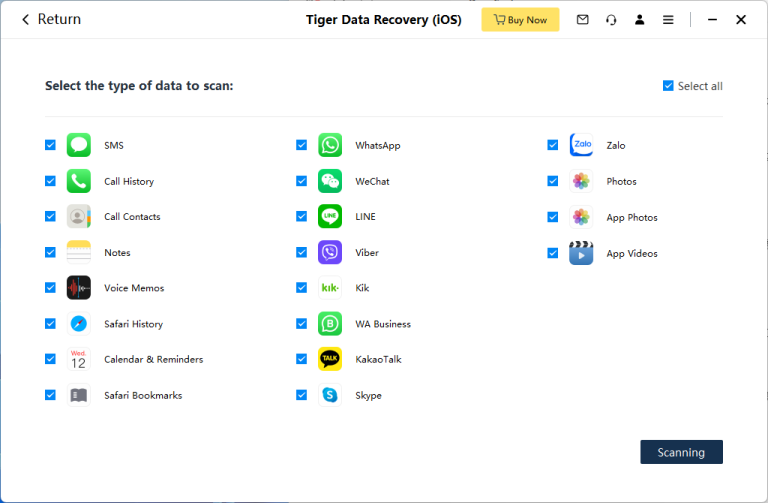
A: Yes. Tiger iOS data recovery software supports recovering chat messages and attachments from popular social and messaging apps like WhatsApp, WeChat, LINE, Viber, and QQ.
Q: What is the success rate for recovering lost files?
A: Tiger Data Recovery boasts a remarkable success rate of up to 97% for recovering lost files. While success depends on factors like the data type and how it was lost, starting the recovery process as soon as possible generally leads to the best results.
To summarize, this article has provided you with four effective methods to restore deleted contacts on your iPhone. You can use the versatile Tiger iPhone Data Recovery, leverage iCloud’s restoration features, or revert to an iTunes/Finder backup. We hope that the featured Tiger Data Recovery tool meets all your expectations for getting your valuable contacts back. If you have more questions, please let us know in the comments section below. Thank you!
You May Also Like
Explore practical ways to recover deleted iPhone photos and restore the memories that matter to you.
View the Recovery Methods →Discover faster and easier ways to restore deleted WhatsApp messages from an available backup.
See the Recovery Methods →Learn how to transfer contacts from an old iPhone to a new iPhone quickly and safely.
Read the Transfer Guide →


