Want to prevent others from exporting your WhatsApp conversations or automatically saving private photos to their galleries? WhatsApp Restricted Chat gives you more control over how messages and media are shared outside the app.
Restricted Chat is an upgraded version of Advanced Chat Privacy, which WhatsApp introduced in April 2025. It retains the original protections against chat exports, automatic media saving, and certain Meta AI features while adding a new restriction: access to protected conversations from WhatsApp Web or other linked devices can be blocked.
However, Restricted Chat does not prevent screenshots or guarantee that messages cannot be copied manually.
In this guide, we’ll explain what Restricted Chat does, how to enable it on iPhone and Android, and what you should know about its availability in 2026.
Restricted Chat is being introduced to selected WhatsApp beta testers on iPhone and Android. The upgrade currently focuses on individual conversations. If you don’t see Restricted Chat, you may still have the original Advanced Chat Privacy feature.

What Is WhatsApp Restricted Chat?
Restricted Chat is an upgraded privacy feature introduced through WhatsApp beta testing in 2026. It builds on Advanced Chat Privacy, which launched in April 2025.
WhatsApp personal messages and calls already use end-to-end encryption. Restricted Chat adds a different type of protection: it limits certain ways participants can export, save, or access conversation content after receiving it.
In addition to the original restrictions on chat exports, automatic media saving, and certain Meta AI features, the upgrade restricts access to protected conversations through linked devices.
For example, imagine discussing sensitive information in a private conversation. You may want to prevent another participant from exporting the full chat history, automatically saving its photos, or viewing the conversation on a connected computer.
Restricted Chat is designed to limit these activities.
The setting applies only to the selected conversation. It does not automatically affect every chat in your WhatsApp account.
What Does WhatsApp Restricted Chat Do?
Restricted Chat provides four main protections. The first three come from Advanced Chat Privacy, while linked-device restrictions are part of the newer upgrade.
1. Prevents Chat Exports
Normally, WhatsApp allows users to export a conversation, including its messages and, optionally, media files.
When Restricted Chat is enabled, participants cannot use WhatsApp’s built-in Export Chat feature to export that conversation.
This makes it harder to transfer an entire chat history into another application or file.
However, it does not stop someone from manually recording or reproducing information visible on their screen.
2. Stops Automatic Media Saving
Depending on their settings, WhatsApp users may automatically save received photos and videos to their device galleries.
Restricted Chat prevents media from the protected conversation from being automatically saved to participants’ device galleries on supported versions.
This can be useful when sharing personal photos or sensitive information that you don’t want automatically stored outside WhatsApp.
Note: This restriction concerns automatic saving. It cannot guarantee that another participant will never capture or share the content manually.
3. Restricts Meta AI Features
Restricted Chat also limits certain Meta AI features within the protected conversation.
For example, participants cannot use supported Meta AI features to ask questions about the conversation or generate summaries from its messages.
This does not mean Meta AI normally reads every WhatsApp conversation.
WhatsApp personal messages are protected by end-to-end encryption. Meta AI does not automatically have access to every private message and can access information users explicitly share through supported AI interactions.
4. Blocks Access from Linked Devices
The key addition in Restricted Chat is a restriction on accessing the protected conversation through linked devices.
In supported beta versions, a restricted conversation remains accessible on the participants’ primary phones rather than through linked sessions such as WhatsApp Web or WhatsApp Desktop.
This helps reduce the possibility of conversation content being accessed through connected computers, secondary devices, or unofficial clients that rely on linked-device connections.
Unlike the original Advanced Chat Privacy feature, Restricted Chat adds this protection to the selected conversation.
For background information, see WhatsApp’s official announcement of Advanced Chat Privacy.
How to Enable WhatsApp Restricted Chat
Restricted Chat can be enabled for supported individual conversations. The menu layout may vary depending on your device, account, and WhatsApp version.
As of October 2026, the upgraded feature is available to selected beta testers rather than all WhatsApp users.
How to Enable Restricted Chat on iPhone
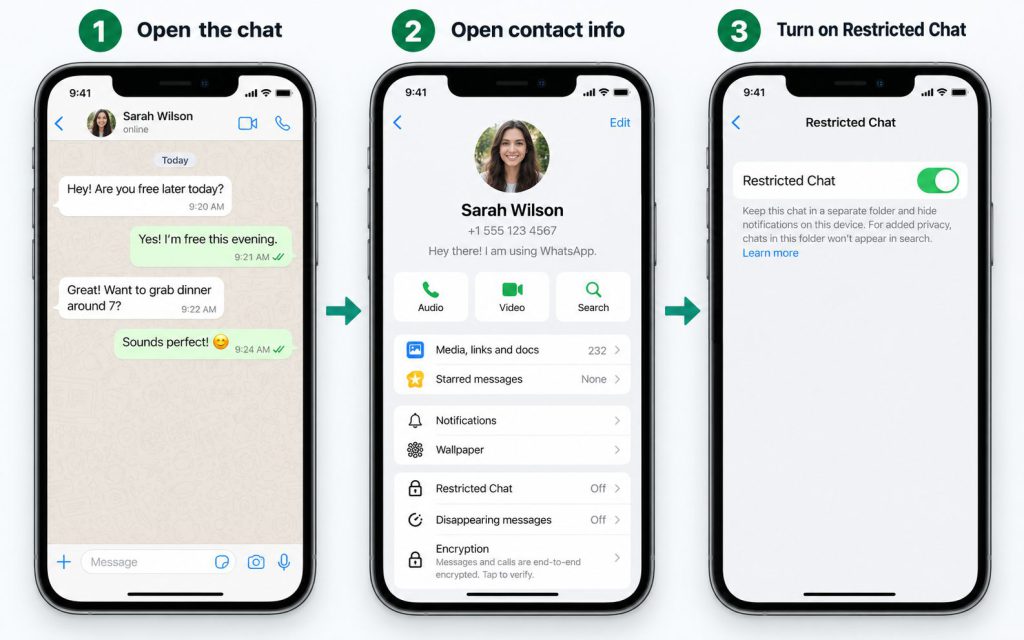
If your iPhone has received the Restricted Chat feature, you can enable it from the conversation information screen.
Steps:
- Open WhatsApp on your iPhone.
- Select the individual conversation you want to protect.
- Tap the contact’s name at the top of the chat.
- Find and select Restricted Chat.
- Review the restrictions and turn on the setting.
- Confirm the change if prompted.
Once enabled, the supported restrictions apply to that conversation.
How to Enable Restricted Chat on Android
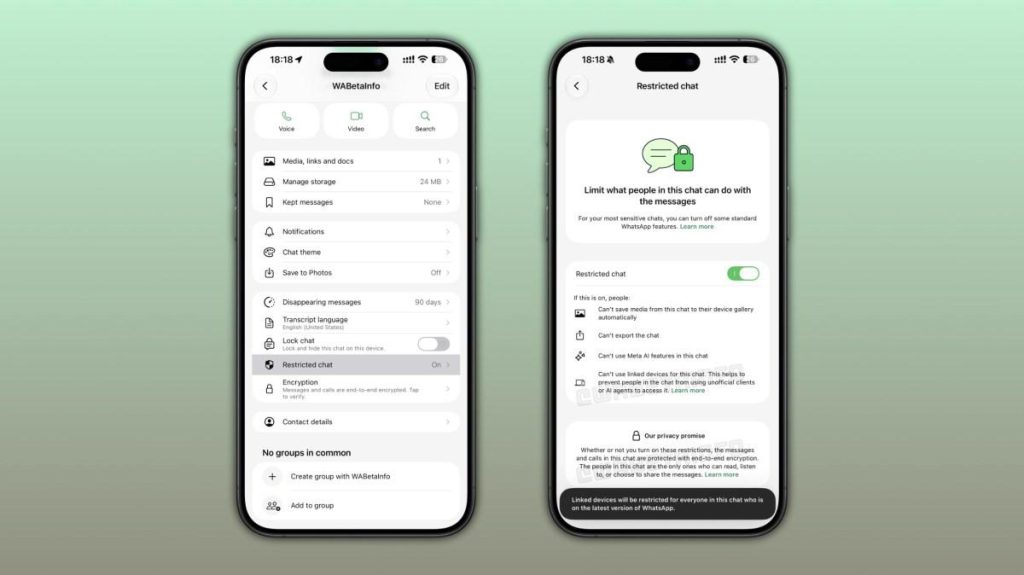
Android users with a compatible beta version can also access Restricted Chat through the conversation information screen.
Steps:
- Open WhatsApp on your Android phone.
- Select the individual conversation you want to protect.
- Tap the contact’s name at the top of the chat.
- Find the Restricted Chat setting.
- Turn on the feature and confirm your choice.
The setting applies to the selected conversation rather than every chat on your account.
If you cannot find Restricted Chat, check whether your account and WhatsApp version have received the beta feature.
Can You Enable Restricted Chat in WhatsApp Groups?
As of October 2026, the new Restricted Chat feature is being tested primarily in individual conversations. Its availability for group chats has not yet been confirmed as part of the current beta rollout.
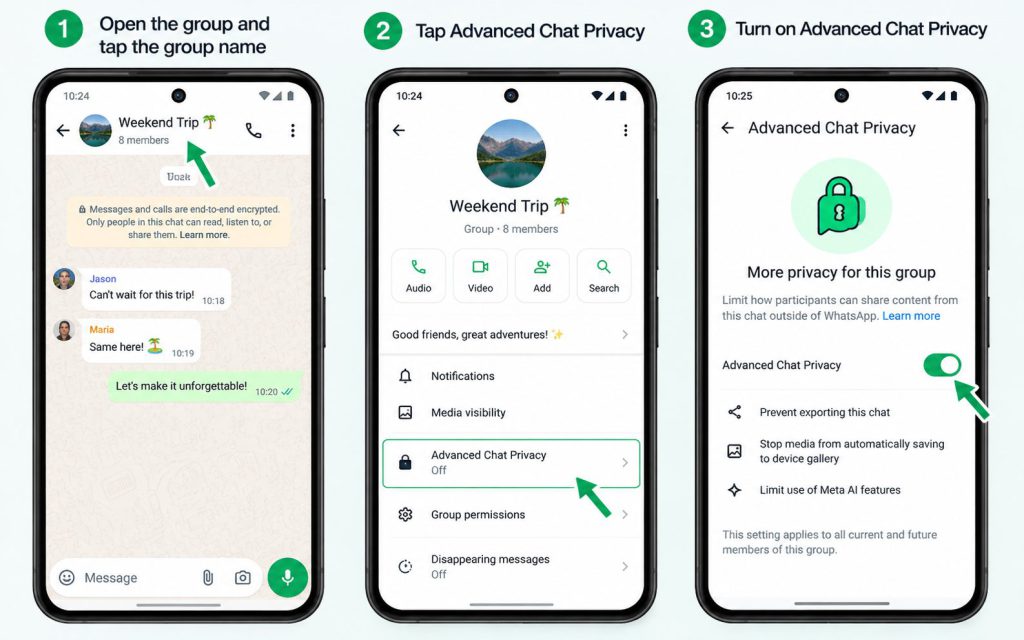
However, WhatsApp groups can use the original Advanced Chat Privacy feature.
Advanced Chat Privacy restricts chat exports, automatic media saving, and certain Meta AI features.
How to enable Advanced Chat Privacy in a group:
- Open the WhatsApp group.
- Tap the group name to open Group Info.
- Find Advanced Chat Privacy.
- Review the available permissions if you cannot change the setting.
- Turn on the feature and confirm.
Group permissions determine who can manage this setting. Depending on the group’s configuration, an administrator may need to make the change.
Important: Advanced Chat Privacy in group chats does not provide the same confirmed linked-device restriction as the newer Restricted Chat beta.
What WhatsApp Restricted Chat Cannot Protect
Restricted Chat reduces several ways conversation content can be shared outside WhatsApp, but it cannot prevent every possible form of copying or recording.
Before relying on the feature, it’s important to understand its limitations.
| Activity | Can Restricted Chat Block It? |
|---|---|
| Exporting the chat through WhatsApp | Yes |
| Automatically saving media to the device gallery | Yes, on supported updated versions |
| Using certain Meta AI features | Yes |
| Accessing the chat through linked devices | Yes, in the Restricted Chat beta |
| Taking screenshots of messages | No |
| Photographing the screen with another phone | No |
| Manually recording or repeating information | No |
| Deleting content saved before activation | No |
For example, even if WhatsApp prevents someone from exporting a chat, that person may still photograph the conversation using another device.
Enabling Restricted Chat also does not delete copies of messages or photos that participants saved before the setting was activated.
For highly sensitive conversations, you should still consider carefully who you share information with.
Restricted Chat vs. Chat Lock: What’s the Difference?
Restricted Chat and Chat Lock are both privacy features, but they address different concerns.
Restricted Chat controls certain ways participants can export, save, or access conversation content.
Chat Lock restricts access to selected conversations on your own device using Face ID, fingerprint authentication, or a device passcode.
| Feature | Restricted Chat | Chat Lock |
|---|---|---|
| Main purpose | Limits content sharing and linked-device access | Restricts access on the user’s device |
| Blocks chat exports | Yes | No, not by itself |
| Stops automatic media saving | Yes | No, not by itself |
| Restricts linked-device access | Yes, in the beta feature | Not its primary function |
| Requires authentication to open the chat | No | Yes |
| Individual chats | Supported in the current beta | Supported |
| Group chats | Not confirmed in the current beta | Supported |
Restricted Chat focuses on what participants can do with shared conversation content. Chat Lock helps protect access to conversations on your own phone.
If you want additional protection, you can use Chat Lock alongside the available chat privacy settings.
To learn more, see our guide on how to lock WhatsApp chats with a secret code.
Why Is Restricted Chat Not Showing on WhatsApp?
If you cannot find the Restricted Chat option, there are several possible explanations.
1. Restricted Chat Has Not Reached Your Account
As of October 2026, Restricted Chat is being gradually introduced to selected beta testers.
Installing the latest public WhatsApp version does not guarantee immediate access.
2. Your Version Still Uses Advanced Chat Privacy
If you see Advanced Chat Privacy instead of Restricted Chat, your account may still be using the original feature.
The older setting supports export restrictions, automatic media saving restrictions, and certain Meta AI limitations, but it does not include the newer linked-device restriction.
3. You Are Checking a Group Conversation
The current Restricted Chat beta focuses on individual conversations.
For groups, check whether the original Advanced Chat Privacy setting is available.
4. Group Permissions Prevent You from Changing Settings
For Advanced Chat Privacy in groups, the applicable group permissions determine who can change the setting.
If you cannot enable it, ask a group administrator to review the options.
5. The Conversation Does Not Support the Feature
Some business conversations may not support Advanced Chat Privacy, particularly when businesses use Meta services to store and manage their messages.
For information about the original feature, visit the official WhatsApp Help Center.
Frequently Asked Questions
Does WhatsApp Restricted Chat Prevent Screenshots?
No. Restricted Chat does not generally prevent screenshots of WhatsApp messages.
It focuses on restricting built-in exports, automatic media saving, certain Meta AI features, and linked-device access.
Can Someone Turn Off Restricted Chat?
In supported individual conversations, participants may be able to change the setting.
Changes to the conversation’s restrictions affect the chat rather than only the person who made the change.
Does Restricted Chat Stop Meta AI from Reading Messages?
Restricted Chat limits certain Meta AI features within the conversation.
Personal WhatsApp messages are already protected by end-to-end encryption. Meta AI does not automatically read all private conversations.
Does Restricted Chat Delete Old Messages?
No. Restricted Chat restricts how conversation content can be exported, saved, or accessed.
It does not automatically erase your existing conversation history.
If you want messages to disappear after a selected period, use WhatsApp’s Disappearing Messages feature.
Is Restricted Chat Available on iPhone and Android?
The feature is being introduced through beta testing on both platforms.
As of October 2026, it is available to selected testers, but not every WhatsApp user has received it.
The original Advanced Chat Privacy feature is more widely available on compatible WhatsApp versions.
Does Restricted Chat Work in WhatsApp Groups?
Support for groups has not been confirmed in the current Restricted Chat beta rollout.
For group conversations, WhatsApp’s existing Advanced Chat Privacy feature remains an option on supported accounts.
Is Restricted Chat the Same as Advanced Chat Privacy?
Restricted Chat is an upgraded version of Advanced Chat Privacy.
It retains the original privacy controls and adds a restriction on linked-device access to protected conversations.
Conclusion
WhatsApp Restricted Chat provides additional control over how participants export, save, and access messages from a protected conversation.
It retains the original Advanced Chat Privacy protections and adds the ability to restrict access from WhatsApp Web and other linked devices.
However, the upgraded feature is still being introduced through beta testing as of October 2026, and it cannot prevent other participants from manually capturing or sharing information.
For more ways to protect your account, read our WhatsApp privacy settings guide to learn how to control who can view your personal information, contact you, and access your conversations.